Expense tracking for two
Where your household’s money went, in ten minutes a month
Once a month you upload your monobank, Revolut or ActivoBank statements and see how much came in, where it went and how much is left, in euros. When Helio doesn’t recognise something, it doesn’t guess. It asks whoever paid.
Helio Premium: €54.99 a year or €17.99 a month for the whole household. Choose Premium
Built for iPhone Duo
Open the phone and your month becomes a two-page family account book: last month on one page, this month on the other, categories lined up across the fold. Choose a category on the left and its operations open on the right.
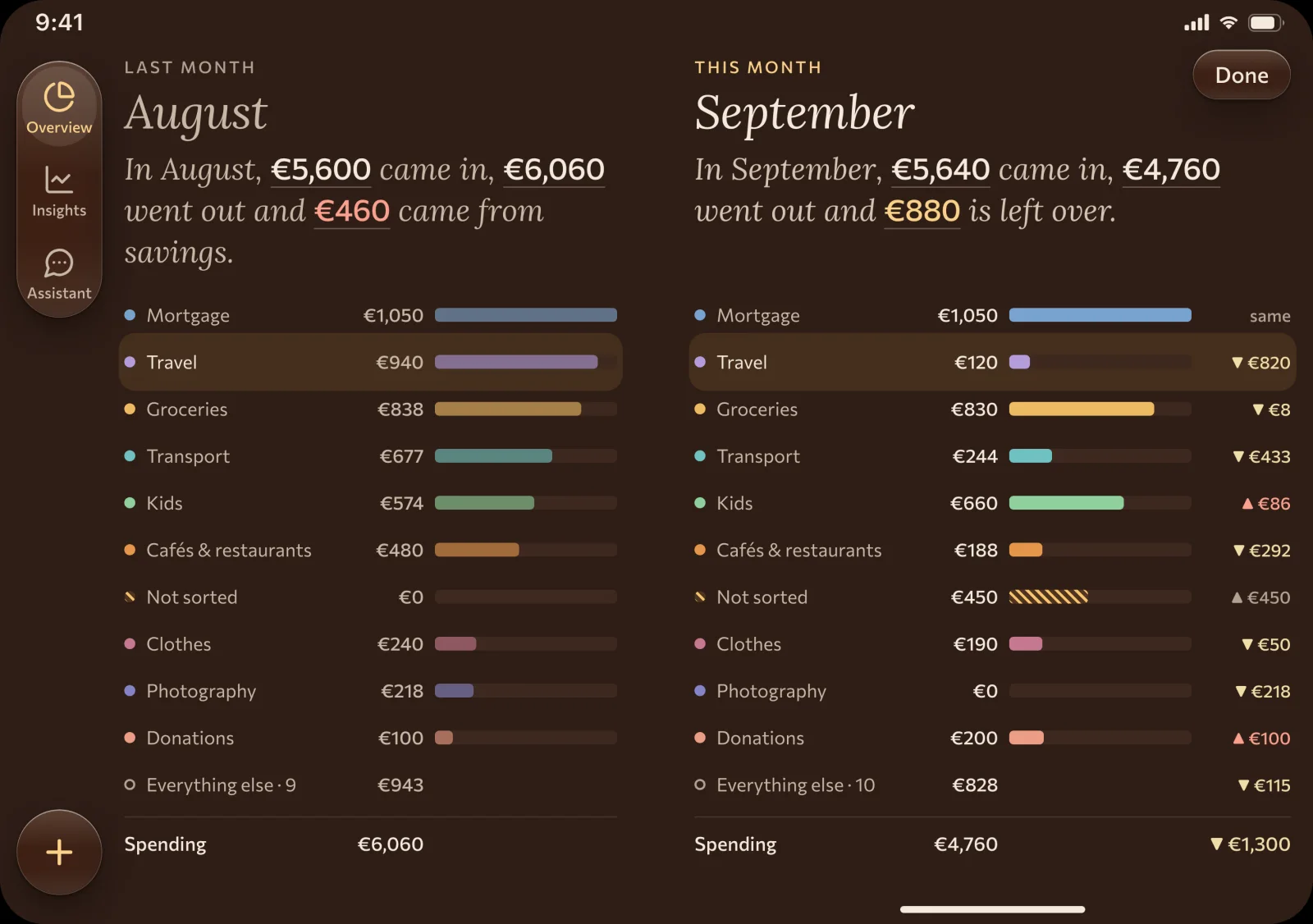
Helio grew out of tracking one real household. The names and amounts stayed with them; here are just the counters.
Once a month
Ten minutes, and the month is closed
No daily entries. The first month takes about an hour, because Helio learns from your answers. After that, about ten minutes: export the statements, answer a few questions.
-
01
Export your statements
In each bank’s app it takes a few taps: a statement for the month, as a CSV or PDF file.
-
02
Helio sorts by your rules
The rules can be read and changed. Hryvnias and dollars are converted at the rate the bank actually used.
-
03
Answer together and see the picture
Whatever the rules don’t know becomes a question for whoever paid. Once it’s answered, the month is done.
Privacy
Your money doesn’t become our data
A statement shows your whole life for a month, so we take only as much of it as the picture needs: date, amount, currency and description. We never ask for bank passwords, so we can’t move your money either.
No bank passwords
We never ask for a login, a password or an SMS code. Only the files you exported yourself.
The file stays in your browser
The statement is read in your browser and only the operations are saved. The file itself is never uploaded.
Data in the EU
Transactions are stored in a Google Cloud data center in Belgium. We don’t sell data and we don’t show ads.
No trackers
The site has no ad pixels and no third-party analytics. There is no cookie banner either, because there are no cookies.
For two
Each of you answers for your own purchases
Helio doesn’t guess. An unfamiliar transaction becomes a question for whoever paid, and their partner sees the answer. Answer once, and next month the rule does it for you.
- Everyone signs in with their own Google or Apple account and sees the shared overview.
- Mine, my partner's, together: one switch on every screen.
- Helio sees only what you’ve uploaded. A card whose statement you don’t add stays yours alone.
- The question “what was that?” waits in the app, not over dinner.
Banks and currencies
Hryvnias, euros and dollars on one screen
Helio converts a transaction in hryvnias or dollars into euros at the rate the bank actually used that day. That is why the totals match what you paid.
Fictional family
| Bank | Transaction | Amount | Bank rate | In euros |
|---|
The day's rate is taken from your own euro transactions in the same statement. Not a reference rate, but the one you actually got.
Banks today
- monobankCSV
- RevolutCSV
- ActivoBankPDF
Revolut works in any EU country. We add new banks based on how many people ask for them.
There is no automatic connection to banks. On purpose: no passwords, and nothing breaks when a bank changes something.
- Each of you signs in with your own accountGoogle or Apple. Your first sign-in creates your household, and you are its owner.
- The owner invites by linkProfile › Household on the web, Settings › Members on iPhone. The link works once and for 7 days.
- Your partner joins with their own accountFrom then on you both see the same transactions, categories and goals, on the web and on iPhone.
- Premium belongs to the householdOne payment for the whole household. Sign in to your cabinet and open Plan to choose monthly or yearly billing.
- 30 days of full history to startThen the Free plan shows the current month and the three before it. Nothing is deleted.
Price
Free or Helio Premium. Both plans are live.
Helio Premium: €54.99 a year or €17.99 a month for the whole household.
Free
All screens, all banks, every member of the household. The current month and the three before it.
Helio Premium Available now
Or €17.99 a month
Your whole history with no limit and trends over the years. One price for the whole household.
The Helio iPhone app is on the App Store. In the app, Premium is an App Store subscription.
One forgotten €5-a-month subscription costs more than a year of Helio.
Choose PremiumHonestly
Who Helio is for, and who it isn’t for
Helio is for you if
- you two have more than one card;
- you want to look at the money together with your partner;
- a summary once a month is enough for you.
Helio isn’t for you if
- you need daily budgets and notifications;
- you want only an automatic bank connection, with no files at all;
- you need Ukrainian sole trader (FOP) bookkeeping or tax returns. Helio will count FOP income moved to a personal card as household income.
When can I start?
Start now: sign in with Google or Apple, upload your statements and choose Free or Premium in Plan.
Do I need to give access to my bank?
No. You export a statement in your bank’s app and upload the file to Helio. We don’t see your passwords and can’t do anything with your account.
Which banks are supported?
Today: monobank, Revolut and ActivoBank. Every import is checked against the balance in the statement: if it doesn’t add up, Helio stops instead of guessing. We add more banks on request.
Does my partner see all my spending?
Only what you’ve uploaded yourself. A card whose statement you don’t add, Helio doesn’t see at all. You both see everything that’s uploaded, and a switch shows yours, your partner’s, and both together.
Do I need a Google or Apple account?
Yes, you sign in with Google or Apple. Each of you has your own account, and we don’t see its password.
How do you convert hryvnias and dollars into euros?
At the rate the bank actually used that day. It can be seen from your own euro transactions in the same statement. That is why the amounts in Helio match what you paid.
What happens if Helio doesn’t recognise a transaction?
It doesn’t silently land in “Other”. It becomes a question for whoever paid. The answer can be saved as a rule, and next time a transaction like it sorts itself.
How long does it take?
The first month takes about an hour: you upload several months at once, and Helio learns from your answers. After that, about ten minutes a month, because it already knows your purchases and asks only about new ones.
What happens after the 30 day trial?
every new household will get 30 days of the full history with no card. After that nothing is charged: you stay on the Free plan with the current month and the three before it. Older months aren’t deleted and will open up if you choose Helio Premium.
First, close a month for a fictional household
The demo holds a month of a sample family: see where the money went and answer seven questions.